This article is for informational purposes for healthcare professionals and administrators. It does not constitute medical advice.
The constant ringing of the phone, the growing stack of patient clipboards, and the endless cycle of manually entering data into the EHR—this is the daily reality for many healthcare front offices. This administrative overload does more than just cause frustration; it directly impacts patient care, leading to data entry errors, longer wait times, and a higher rate of costly no-shows. The result is a burned-out staff and an inefficient practice. Fortunately, there is a more intelligent way to manage these critical tasks. Automated scheduling and patient intake are foundational administrative processes in healthcare that can be fully streamlined to reduce workloads and boost efficiency. Modern systems integrate online appointment booking and digital forms directly into a practice’s Electronic Health Record (EHR).
The Core Problems of Manual Processes: Why Your Practice is Leaking Time and Revenue
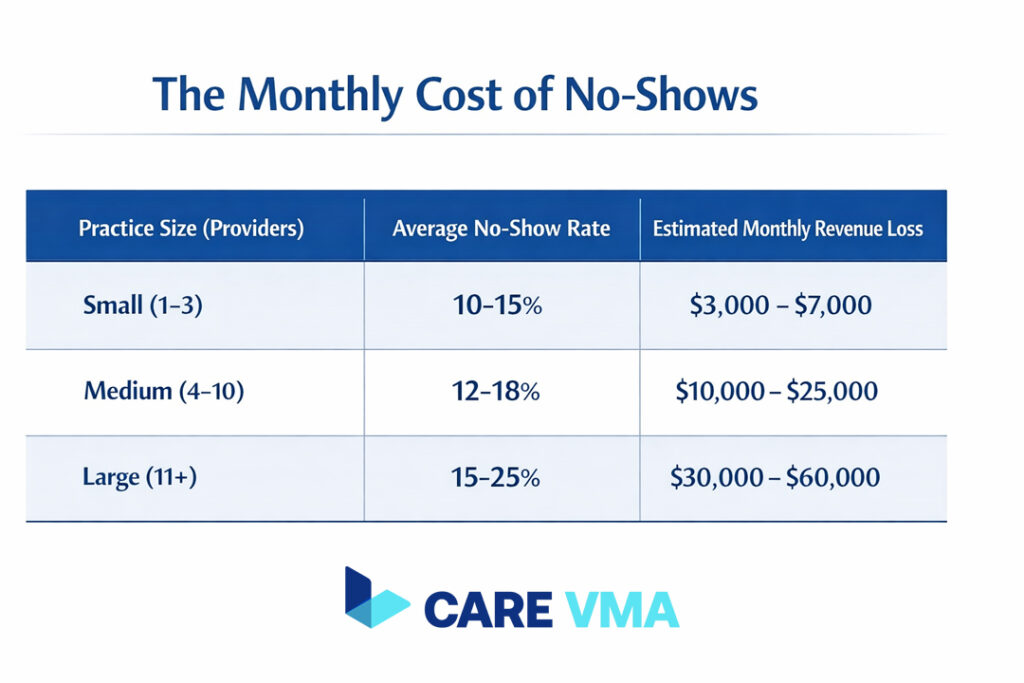
Relying on traditional, manual methods for scheduling and intake creates significant operational friction. These inefficiencies are not just minor annoyances; they represent tangible losses in both productivity and revenue, while also introducing unnecessary risks to patient care.
The Risk of Data Entry Errors and Their Impact on Patient Care
Manual data entry is prone to human error. A simple typo when inputting a patient’s allergy information, medication history, or insurance ID can have serious consequences. These errors can lead to incorrect clinical decisions, dangerous drug interactions, or rejected insurance claims, creating a cascade of problems for both the patient and the practice. An integrated system for EHR & EMR Management: A Best Practice Guide is essential to mitigate these risks.
High No-Show Rates and Financial Losses
Patient no-shows are a major source of lost revenue for healthcare practices. When a patient fails to attend an appointment, the practice loses income for that time slot and the opportunity for another patient to be seen. According to research, the financial impact is substantial, with missed appointments costing the U.S. healthcare system billions annually. A study published in the Journal of the American Medical Association (JAMA) highlights the widespread challenge and financial drain caused by no-shows.
Administrative Burden Leading to Staff Burnout and Lost Productivity
Front office staff are often overwhelmed by repetitive administrative tasks, from answering calls to manually transcribing patient information. This constant pressure leads to high levels of stress and burnout, which can increase staff turnover and decrease overall productivity. When your team is focused on paperwork, they have less time to engage with patients and provide a positive, welcoming experience. Automating these tasks helps reduce burnout in US healthcare practices, allowing staff to focus on higher-value work.
The Care VMA Solution: End-to-End Integrated Automation
Care VMA transforms your front office by automating the entire scheduling and intake process. Our platform is designed to directly solve the core problems of manual workflows, freeing up your staff, reducing errors, and securing your revenue stream.
24/7 Online Scheduling That Syncs in Real-Time with Your EHR Calendar
Give your patients the convenience of booking appointments anytime, from any device, without needing to call your office. Our online scheduling system integrates directly with your EHR calendar, showing real-time availability. This prevents double-bookings and automatically fills your schedule, ensuring your practice operates at full capacity.
Digital Intake Forms: Say Goodbye to Paper and Clipboards
Eliminate paperwork and manual data entry. Before their visit, patients receive a link to secure digital forms where they can complete their medical history, provide insurance details, and sign consent forms from the comfort of their home. This information is structured and synced directly into the correct fields in the patient’s EHR file, ensuring accuracy and saving valuable time for both staff and patients upon arrival.
Automated Appointment Reminders (SMS & Email) to Reduce No-Shows
Our system proactively tackles the problem of no-shows by sending automated appointment reminders via SMS and email. Patients can confirm their attendance with a single click. If they need to reschedule, the system provides a simple, convenient way to do so, increasing the likelihood that they will re-book instead of simply not showing up.
Automated Insurance Verification Before the Visit
Stop wasting time on hold with insurance companies. Our platform can automatically verify a patient’s insurance eligibility before their appointment. This proactive step significantly reduces the risk of claim denials and accelerates your revenue cycle by ensuring all billing information is accurate from the start. This process streamlines the work often handled by a remote medical biller.
Beyond Efficiency: Bringing the Focus Back to Patient Care
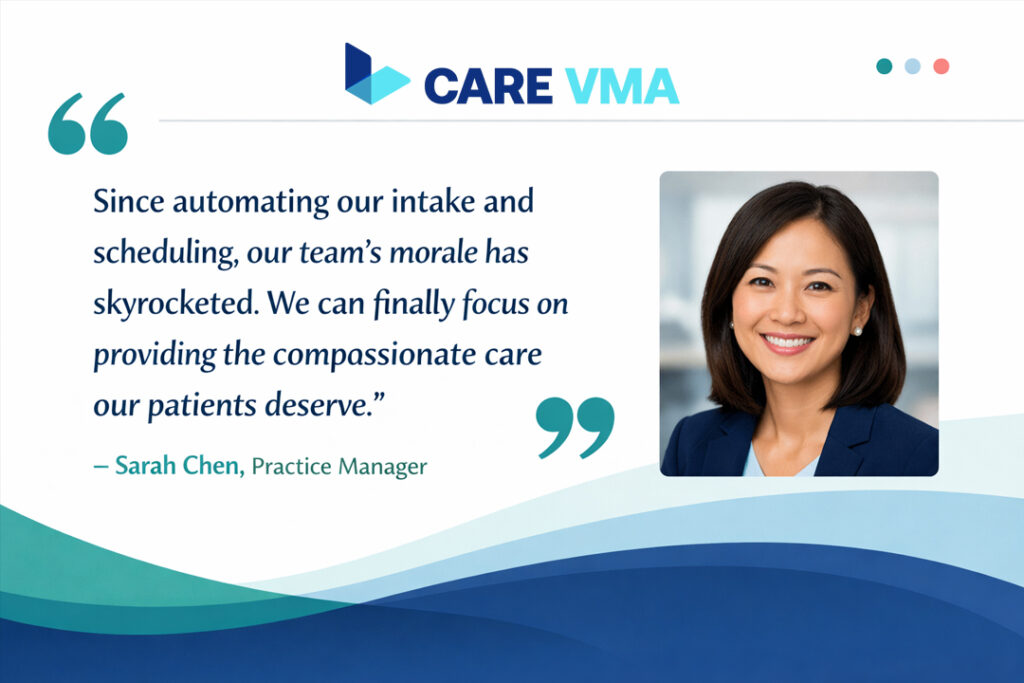
Automating administrative tasks is not just about saving time—it is about fundamentally improving the quality of your practice. By shifting from operational burdens to clinical excellence, you can enhance the experience for everyone involved.
Happier Staff, More Satisfied Patients
When your front office team is freed from tedious, repetitive tasks, they can dedicate their attention to what truly matters: your patients. They have more time to greet patients warmly, answer questions thoughtfully, and provide a personal, supportive experience. This positive environment reduces staff stress and leads to higher patient satisfaction and loyalty.
More Accurate Data for Better Diagnoses
The quality of patient care begins with the quality of patient data. Digital intake forms eliminate issues like illegible handwriting and incomplete information. Clinicians receive a comprehensive, accurate, and neatly organized patient history directly in the EHR. This level of accuracy is critical for making well-informed clinical decisions and developing effective treatment plans, as supported by guidelines from health information authorities like HealthIT.gov on the benefits of electronic health records.
FAQ: Common Questions About System Implementation
Adopting new technology can seem daunting, but our system is designed for a seamless transition. Here are answers to some common questions.
How does Care VMA ensure HIPAA-compliant data security?
We prioritize data security at every step. All patient data is protected with end-to-end encryption, both in transit and at rest. Our platform operates on secure, HIPAA-compliant servers. Critically, patient information from digital forms is synced directly to your EHR system and is never stored on intermediate devices, ensuring the integrity and privacy of protected health information (PHI).
How long does implementation and staff training take?
Our implementation process is structured and efficient, typically taking only one to two weeks. We provide comprehensive online training sessions for your staff to ensure everyone is confident using the new system. Furthermore, we offer continuous technical support to address any questions and ensure a smooth, successful adoption.
Can this system integrate with our custom EHR?
Yes. In addition to supporting a wide range of standard EHR systems, we offer flexible integration options. Our platform can connect with custom or non-standard EHRs via an Application Programming Interface (API). Our dedicated technical team is available to assist with the integration process to ensure a seamless and uninterrupted workflow for your practice.
Conclusion & Next Steps
Modernizing your practice is no longer just an option—it is a necessity for staying competitive and delivering the highest standard of care. Automating your scheduling and patient intake is the single most impactful first step you can take toward achieving superior operational efficiency and clinical excellence. By removing administrative barriers, you empower your team to focus on what they do best: caring for patients.
Do not let administrative tasks get in the way of providing the best care. Schedule a free, 15-minute demo with our specialists to see how our Virtual Medical Assistant Services can transform your practice’s workflow.