![Virtual Clinical Assistants (VCA) 101 [A Guide for Doctors]](https://carevmahealth.com/wp-content/uploads/2026/03/Virtual-Clinical-Assistants-VCA-101-1024x683.jpg)
This article is for informational purposes and does not constitute professional practice management advice. Please consult with a qualified professional for guidance specific to your practice.
How many hours of ‘pajama time’ did you spend last week just finishing EHR entries? For many clinicians, the crushing weight of administrative tasks is stealing time away from patient care and personal life. A Virtual Clinical Assistant (VCA) is a remote professional or AI-powered system that handles non-physical administrative and clinical tasks, acting as a digital extension of your practice to reduce documentation burden and boost physician efficiency.
This constant administrative demand leads to more than just late nights. It fuels physician burnout, diminishes the quality of patient interactions as you focus on a screen instead of the person, and increases the risk of data entry errors due to fatigue. Virtual Clinical Assistants are the modern, strategic solution designed to solve this exact problem, allowing you to return to your core mission: treating patients.
What Is a Virtual Clinical Assistant (VCA)? Dissecting the Two Main Types
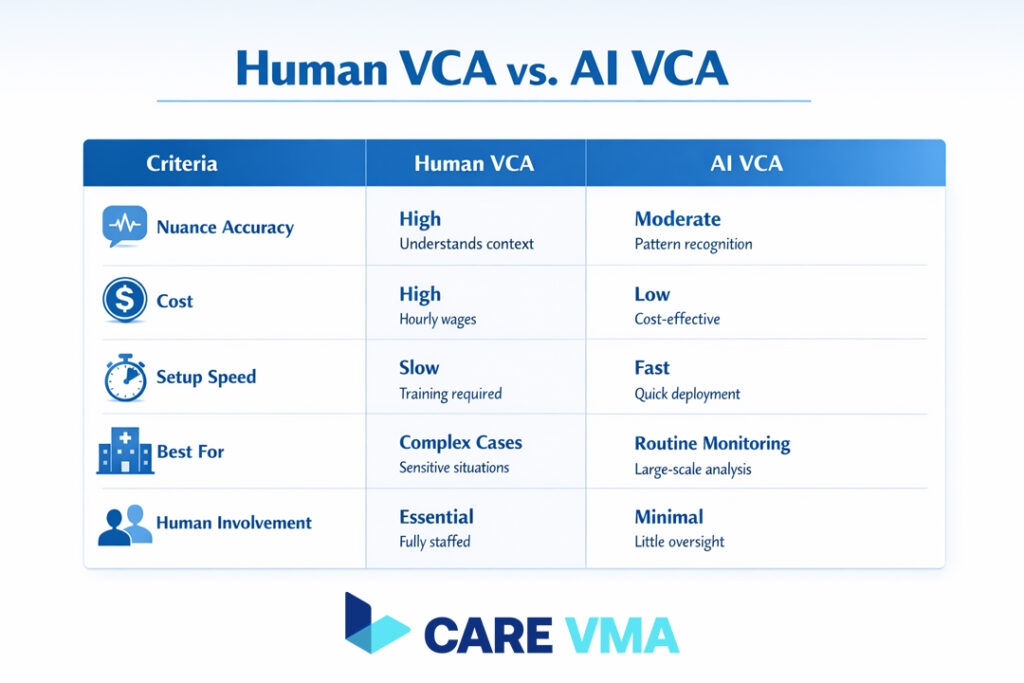
At its core, a VCA is a partner in your practice’s efficiency, but not all VCAs are the same. Understanding the two primary categories is the first step toward finding the right fit for your clinical workflow. It is a key part of understanding virtual medical assistants and their role.
Human VCA: The Human Touch in Remote Efficiency
A Human VCA is a medically trained professional, such as a certified medical assistant or nurse, who connects securely and remotely to your practice’s systems. They handle tasks that require nuance, complex problem-solving, and empathetic communication.
Typical tasks include managing complex appointment schedules, coordinating patient referrals, and handling sensitive patient communications that a machine cannot.
AI VCA: The Power of Automation for Clinical Documentation
An AI VCA is a sophisticated software solution that leverages technologies like Natural Language Processing (NLP) and “ambient listening.” During a patient encounter, the AI listens to the natural conversation and automatically converts it into a structured clinical note, such as a SOAP note, directly within the EHR.
Prominent examples of this technology in 2026 include platforms like Nuance DAX, Abridge, and Suki, which showcase the industry’s rapid advancement in ambient clinical intelligence.
Core Roles and Responsibilities: What Tasks Can You Delegate?
The true value of a VCA becomes clear when you see the specific tasks they can take off your plate. By delegating these responsibilities, you free up cognitive load and valuable time.
Documentation and Medical Scribing
This is the number one killer of ‘pajama time’. A VCA, whether human or AI, listens to patient visits (live or from a recording) and updates the EHR in real-time. This ensures that when the patient leaves, the documentation is already 90% complete. This function is one of the key administrative and clinical tasks your medical VAs can handle.
Administrative Management
Beyond scribing, VCAs excel at managing the operational gears of your practice. This includes managing appointment calendars, performing insurance verifications, handling prescription refills, and navigating the often-tedious process of prior authorizations.
Patient Communication and Triage
A human VCA can streamline the patient intake process by collecting initial symptoms and medical history before you even enter the room. They can also perform post-visit follow-up calls to check on patients, answer basic questions, and ensure they understand their care plan.
Key Benefits of VCA Implementation: More Than Just Efficiency
Integrating a VCA is a strategic business decision that pays dividends in clinical quality, financial health, and personal well-being. The benefits go far beyond simply getting work done faster.
Reduce Burnout and Reclaim Your Time
Studies have shown that physicians can spend up to 50% of their workday on EHR tasks and other desk work. A VCA can reclaim an estimated 2 to 3 hours of documentation time each day, directly combating the primary drivers of physician burnout solutions. This significant reduction in administrative burden is confirmed by sources like the American Medical Association, which highlights the negative impact of after-hours EHR work.
Enhance the Patient Experience
When a VCA handles the note-taking, you are free to turn away from the computer and maintain eye contact with your patient. This simple change transforms the encounter, fostering deeper trust, improving communication, and leading to higher patient satisfaction.
Operational Cost-Effectiveness
Hiring a remote VCA can be 60-70% more cost-effective than an in-office assistant. This is due to significant savings on physical office space, equipment, benefits, and payroll taxes, making it a financially prudent choice for practices of all sizes.
Flexible Practice Scalability
A virtual workforce provides unparalleled flexibility. You can easily scale your VCA support up or down to match demand during busy periods, like flu season, without undergoing a lengthy and costly traditional hiring process.
Practical Implementation Guide: 5 Steps to Get Started with a VCA
Knowing you need a VCA is one thing; implementing one is another. This practical, five-step roadmap is designed for busy clinicians to integrate a VCA seamlessly and effectively.
- Step 1 – Audit Your Workflow Before you hire, identify your biggest time sinks. For three days, track and list the top 3 non-clinical tasks that consume the most time, such as prior authorizations, lab data entry, or referral coordination. This data will define your VCA’s primary role.
- Step 2 – Define the Scope (Human or AI?) Use your audit to make an informed decision. If your biggest bottleneck is purely clinical documentation during visits, an AI VCA is likely the most efficient choice. If your needs revolve around complex coordination, patient interaction, and multi-step administrative tasks, a Human VCA is the better fit.
- Step 3 – Choose the Right Service Provider Not all VCA companies are created equal. Prioritize providers that specialize in healthcare. A reputable partner will guarantee their VCAs are trained in medical terminology and are fully certified in HIPAA compliance and data security. This ensures they understand the clinical context and legal framework of your practice from day one.
- Step 4 – The Onboarding and “Shadowing” Process Dedicate the first week to onboarding. Have your VCA “shadow” your workflow, listening to your patient encounters and observing your EHR habits. This allows them to learn your specific phrasing, documentation preferences, and the unique rhythm of your practice.
- Step 5 – Create a Feedback Loop For the first 30 days, schedule a brief, 5-minute check-in at the end of each day. This allows you to provide immediate feedback, correct any errors quickly, and fine-tune the workflow for maximum efficiency. This small time investment upfront pays off exponentially.
Security and HIPAA Compliance: The Non-Negotiable Aspect
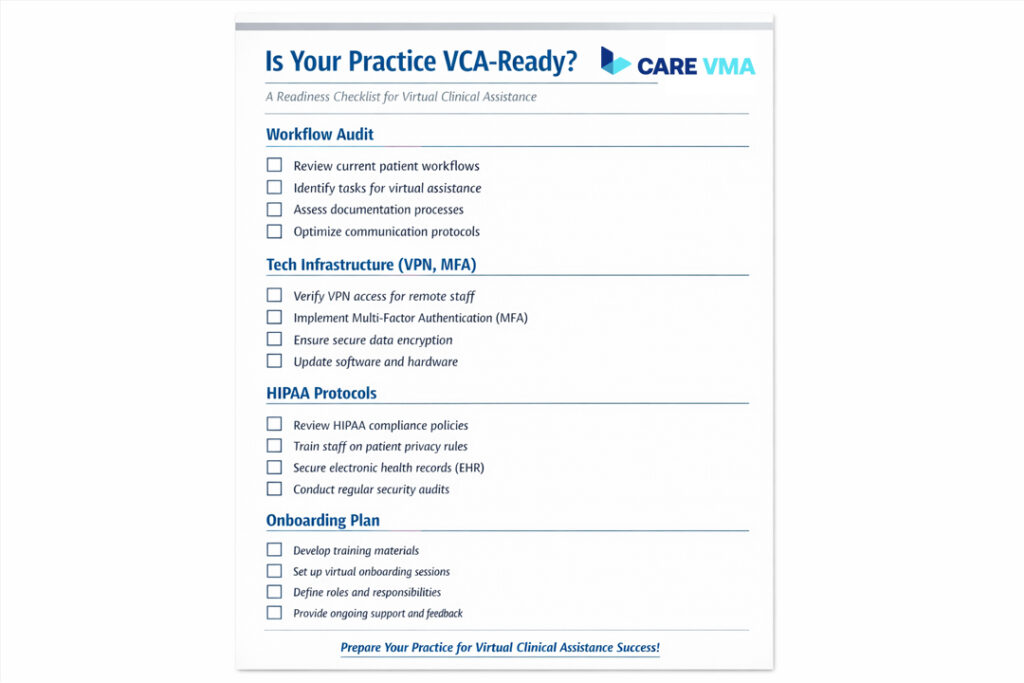
Integrating a remote team member requires an ironclad security protocol to protect patient health information (PHI). Trust is paramount, and it is built on a foundation of robust technical safeguards.
Secure Access is Key Every VCA must access your EHR and other systems through a secure Virtual Private Network (VPN). Furthermore, Multi-Factor Authentication (MFA) should be mandatory for every login. These two layers are the minimum standard for secure remote access in healthcare, as outlined by federal guidelines from the U.S. Department of Health & Human Services.
Encrypted Communication Tools All communication containing PHI must occur on secure, encrypted platforms. This means avoiding standard email or text messaging in favor of compliant tools like the healthcare version of Microsoft Teams or a dedicated, secure VCA platform.
Never Share Passwords Each VCA must be assigned a unique, individual login for every system they access. Sharing credentials is a major security risk and makes it impossible to conduct audits or assign accountability. Unique logins ensure every action is traceable.
FAQs (Common Doctor Questions about VCAs)
What is the average cost for VCA services?
The cost model depends on the type. Human VCAs are typically billed at an hourly rate, which can range from $15-$40 per hour depending on skill level and location. AI VCAs usually operate on a monthly subscription model, often ranging from $200-$800 per provider per month based on features and integration depth.
How do patients react to a VCA’s presence (human or AI) during a consultation?
Patient acceptance is very high when introduced properly. For a human VCA, a simple script works wonders: “I have my clinical assistant, [Name], joining us remotely today to help with my notes so I can give you my full attention.” For AI, you can say: “I’m using a secure recording tool to help create my notes for our visit, which allows me to focus completely on you.” Transparency is key.
Can a VCA integrate with my current EHR system?
Yes, integration capabilities are broad. The most basic and universal method is a secure “copy-paste” workflow that is compatible with any EHR. More advanced solutions offer deep API integration with major platforms like Epic or Cerner, allowing the VCA’s work to flow directly into the patient chart for your final review and signature.
Conclusion and Next Steps
In 2026, the Virtual Clinical Assistant is no longer a luxury but an essential strategic tool for combating physician burnout and building a more resilient, patient-focused practice. By offloading the administrative burden, you can reclaim your time, reconnect with your patients, and rediscover the joy of practicing medicine.
Feeling overwhelmed by administrative work? Don’t let ‘pajama time’ steal another valuable moment. Schedule a free 15-minute consultation with our clinical workflow experts at Care VMA to analyze your practice’s unique needs and discover the right Virtual Medical Assistant solution for you.